Soda
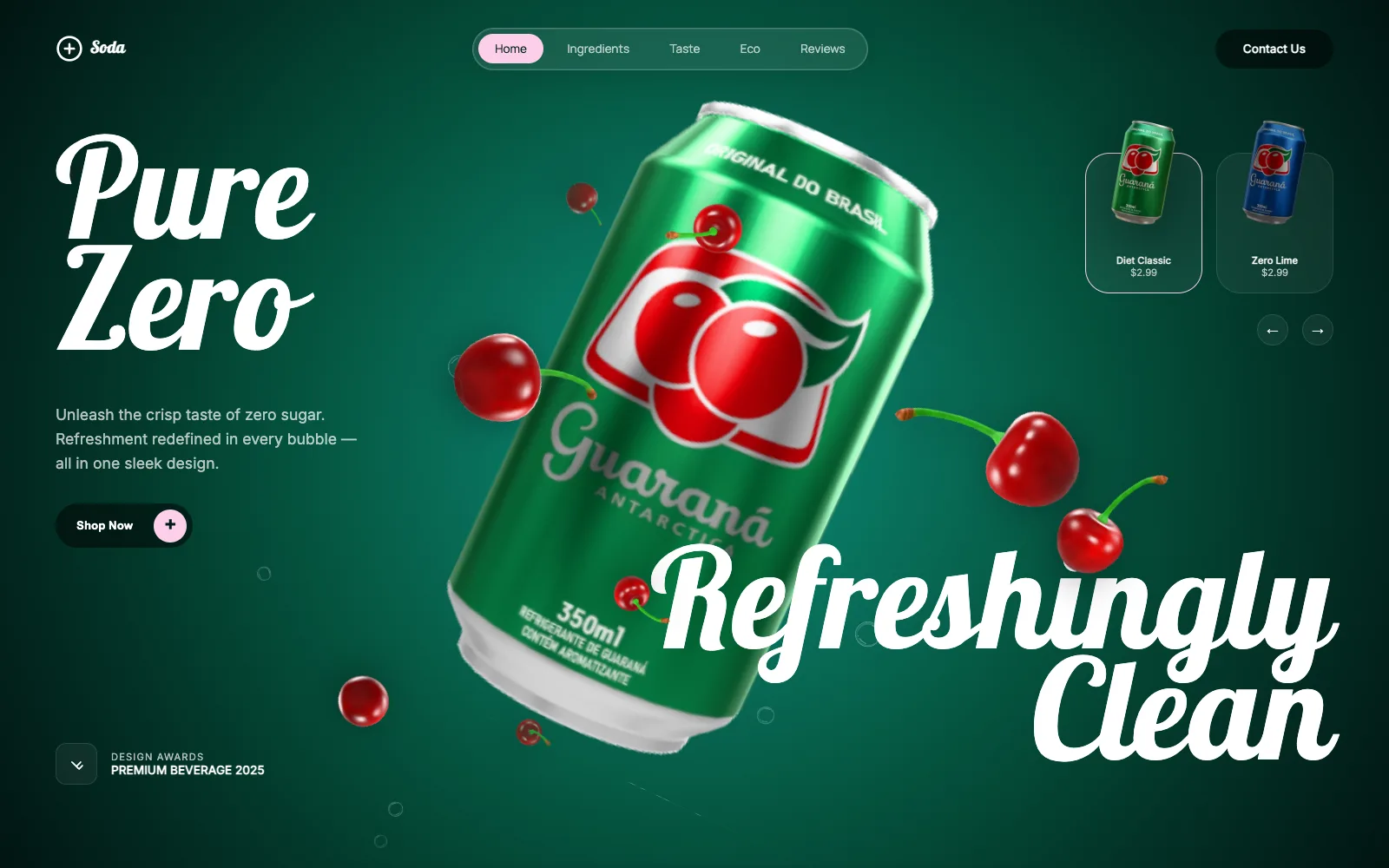
Move the cursor and the can leans toward it while the cherries around it scatter out of the way. Pick a flavor and the can spins, changes its label at the fastest point of the turn, and the cherries come back as blueberries. Grab the can to spin it by hand, or scroll and it travels beside each section's copy.
- html5
- css3
- javascript
- gsap
- Format
- Interactive experience
- Platform
- Desktop + Mobile
- Engine
- model-viewer + GSAP
- Type
- Concept
How It Works
1
Every frameTilt
One animation loop eases the cursor position into the can's camera, pushes any cherry within 400px of the pointer away from it, and floats the leaves on their own timers.
2
On clickSwap
Choosing a flavor spins the can a full turn under a motion blur, swaps its label texture at the peak of the spin, and pulls every cherry to the center before it bursts back out as the other fruit.
3
On scrollTravel
Each section moves the can to its own resting spot and turns it exactly once on the way, so it arrives with the label forward. With reduced motion on, scrolling stays native and the section reveals and review marquee hold still.
4
InteractiveGrab
A press on the can itself spins it by hand, and once you let go it coasts before easing back around to the label.
Engineering
A can that always lands on its label
My first scroll version turned the can in step with page height, so each section stopped it wherever that math landed, often on the nutrition panel. I moved the spin onto the same scroll timeline as the can's position, one full turn per section, and every section now settles on a whole rotation. A hand spin coasts first, then eases to the nearest whole turn.Hand spin that works with the frame loop
The page rewrites the can's camera every frame to follow the cursor, so the viewer's built-in drag input never reached the can. I removed that input and feed the drag in as an offset on top of the loop. The grab checks for a hit by casting a ray from the pointer into the scene, so a click in the empty space beside the can leaves it alone.A model file trimmed at build time
The cherry model carried two leftover scenes, one holding a mesh the viewer could not map, and it logged an error once for every cherry on the page. My build script keeps only the scene that renders and leaves the compressed geometry untouched, and the page loads with an empty console.
More projects


Get in touch
Working end to end across design, creative, and engineering, where creativity, collaboration, and ownership build toward the company's goals.
jeffkliu@gmail.com